What I Wish I Knew About Building ChatGPT Apps (July 2026)
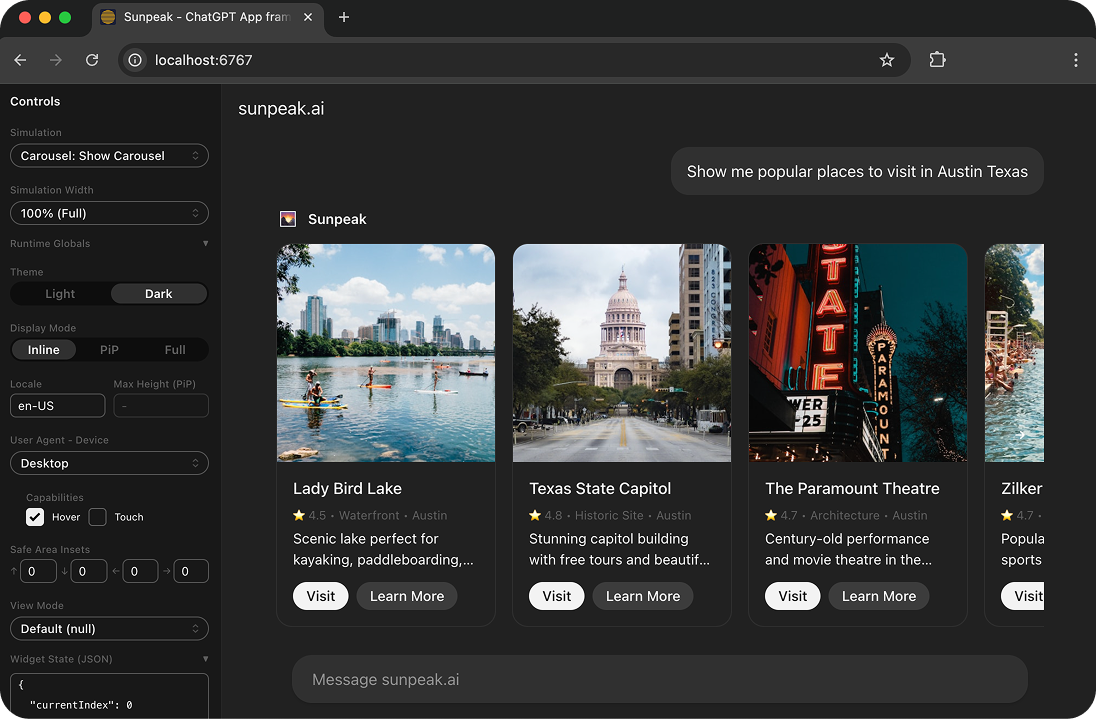
sunpeak ChatGPT App inspector running locally.
After building ChatGPT Apps through the shift from early window.openai examples to the MCP Apps standard, the lessons I wish I had earlier are less about React and more about boundaries. The hard parts are deciding what belongs in a tool, what belongs in a resource, how to keep the UI portable, and how to test without waiting on a real ChatGPT session every time.
TL;DR: Build new ChatGPT Apps as MCP Apps first. Use _meta.ui.resourceUri, the standard ui/* bridge, output schemas, and resource metadata for the portable path. Use window.openai only when you need ChatGPT-specific features. Version resource URIs, test through local simulations, and save live ChatGPT testing for the flows only the real host can prove.
Lesson 1: ChatGPT Apps are MCP Apps now
The biggest mental shift is that a ChatGPT App is not just a web app embedded in ChatGPT. It is an MCP App running in ChatGPT.
That means the core architecture should follow MCP:
- A tool is the server-side action the model can call.
- A resource is the UI document the host renders in an iframe.
- Tool metadata links a tool to its UI resource.
- The host sends tool input and tool results to the UI through the bridge.
- The UI can call tools back through the MCP tool surface when it needs server-side work.
OpenAI now recommends using the MCP Apps standard keys and bridge by default for new ChatGPT Apps, then layering on ChatGPT extensions only when you need behavior that the shared spec does not cover. The key field to internalize is _meta.ui.resourceUri, which is the standard way to link a tool to a UI resource. The older ChatGPT alias, _meta["openai/outputTemplate"], still matters for compatibility, but it should not be the only shape you design around.
This boundary matters because it keeps the app portable. If your resource only knows about ChatGPT globals, every host difference becomes a special case. If your resource speaks the MCP Apps bridge first, ChatGPT-specific APIs become optional upgrades instead of load-bearing infrastructure.
Lesson 2: Use the standard bridge first
Early ChatGPT App examples leaned on the implicit window.openai global. That global is still useful, but it is no longer the clean starting point for app logic.
For new work, start with the MCP Apps bridge:
| App need | MCP Apps standard | ChatGPT extension |
|---|---|---|
| Link a tool to a UI | _meta.ui.resourceUri | _meta["openai/outputTemplate"] |
| Receive initial host state | ui/initialize | Initial window.openai globals |
| Receive tool input | ui/notifications/tool-input | window.openai.toolInput |
| Receive tool results | ui/notifications/tool-result | window.openai.toolOutput |
| Call a server tool | MCP tools/call | window.openai.callTool |
| Send model-visible context | ui/update-model-context | window.openai.setWidgetState |
| Send a follow-up message | ui/message | window.openai.sendFollowUpMessage |
The implementation detail depends on your framework. If you use the raw SDK, you will wire up the bridge directly. If you use sunpeak, the App class and React hooks wrap the host bridge so your component code can stay focused on tool data, display mode, theme, safe area, and app state.
The practical rule is simple: write the portable path first. Then feature-detect ChatGPT-only APIs before calling them.
const openai = typeof window !== 'undefined' ? window.openai : undefined;

if (openai?.requestModal) {
  await openai.requestModal({ template: 'ui://details.html' });
} else {
  setPanelOpen(true);
}
That fallback may feel boring, but it is what lets the same MCP App work in ChatGPT, Claude, and other compliant hosts.
Lesson 3: Tool result shape is part of your UI contract
The UI is only as stable as the data contract behind it. A lot of ChatGPT App bugs start as vague tool results:
return {
  content: [{ type: 'text', text: 'Here are the orders.' }],
  structuredContent: orders,
};
That works until a field changes, a nullable value appears, or the model calls the tool with a slightly different input shape. OpenAI’s Apps SDK docs now show outputSchema in tool examples and recommend declaring one for tools that return structured content. That is the right default.
Use content for model-readable text and summaries. Use structuredContent for the exact JSON your resource renders. Use hidden _meta for data the UI needs but the model should not see, such as pagination cursors, internal IDs, signed URLs, or analytics hints.
For a UI-backed tool, I want each tool definition to answer these questions:
- What arguments can the model pass?
- What structured fields can the UI rely on?
- Which fields can be absent?
- Which data is visible to the model?
- Which resource renders the result?
If you cannot answer those in the tool definition, your tests will need to guess. The app may still render in one happy-path demo, but it will be hard to debug once you add empty states, retries, pagination, approval flows, or multiple display modes.
Lesson 4: Cache behavior can make you debug the wrong build
ChatGPT App resource caching is easy to underestimate. If the deployed bundle changes but the resource URI does not, ChatGPT may keep rendering an older resource. Even when you version the URI, manual testing often still involves refreshing the connector or opening a fresh conversation.
The fix is to treat UI resources as versioned build artifacts:
- Put a build hash or timestamp in the resource URI.
- Make sure each registered resource points at the current bundle.
- Refresh the development app from the Plugins page when testing deployed changes in ChatGPT.
- Keep a local inspector open while iterating so you know whether a bug is in your component or in the host connection.
sunpeak handles this for generated projects by giving you a local inspector and development server built around MCP resources and tools. You can also point npx sunpeak inspect --server <url-or-command> at an existing MCP server, which is useful when the server is not a sunpeak project.
The important habit is separating local UI correctness from real-host integration. First prove the resource renders the right tool state locally. Then test the development app, auth, and model routing in ChatGPT.
Lesson 5: Host context is not decoration
In May 2026, OpenAI added standardized MCP Apps host style variables to ChatGPT through hostContext.styles.variables, with updates sent when the host theme changes. That sounds like a styling detail, but it affects whether an app feels native inside the host.
Avoid hardcoding ChatGPT colors in your component. Read host context for theme, style variables, safe area, display mode, locale, and device capabilities. Your resource can render in inline mode on desktop, fullscreen on mobile, and picture-in-picture when the user wants to keep the UI open while chatting. Each mode changes the layout constraints.
At minimum, test:
- Light and dark themes.
- Inline and fullscreen display modes.
- Narrow mobile widths.
- Long translated labels.
- Safe area insets.
- Loading, cancelled, and error states.
This is where a replicated host runtime pays off. A normal browser story or component test can tell you whether a React component mounts. It cannot tell you whether the app behaves correctly inside the host iframe, with host theme variables, display modes, tool lifecycle notifications, and bridge events.
Lesson 6: Local simulations beat live testing for most bugs
Live ChatGPT testing is still needed, but it should not be your main development loop. It is slower, harder to make deterministic, and more expensive than local tests.
A better testing stack looks like this:
- Unit tests for pure UI logic and hook wrappers.
- Tool handler tests for argument parsing, auth, external API stubs, and output schemas.
- Simulation files for deterministic tool input and tool result states.
- Playwright e2e tests against a local inspector for host rendering.
- Visual regression tests for display modes and themes.
- A small live test suite for ChatGPT developer mode before launch.
sunpeak’s MCP testing framework is built around that split. It can test MCP servers written in TypeScript, Python, Go, Rust, or any other language because the inspector connects to the server over MCP. For sunpeak projects, simulations live alongside your tools and resources. For existing MCP servers, sunpeak test init --server <url-or-command> scaffolds tests around the server you already have.
The point is not to avoid live testing. The point is to use live testing for the things only ChatGPT can prove: development app setup, model tool selection, account-specific auth, production resource loading, and mobile app behavior.
Lesson 7: Approval and lifecycle states need explicit UI
Another May 2026 Apps SDK change moved approval-gated tool input into the MCP Apps ui/notifications/tool-input lifecycle after approval. That is a reminder that tool lifecycle is not just “loading, then result.”
Real apps need UI states for:
- Waiting for tool input.
- Receiving partial or updated input.
- Waiting on user approval.
- Rendering a successful tool result.
- Rendering an error result.
- Handling cancellation.
- Calling follow-up server tools from the resource.
Do not bury these states in one component branch that only handles a populated result. Make them visible in tests. Create simulations for empty result, missing optional data, very long content, error content, and cancelled state. If your app calls server tools from the UI, mock those calls in simulations too.
This also helps model behavior. A resource that shows clear state gives the user confidence. A tool that returns clear content, structuredContent, and schema metadata gives the model less room to guess.
Lesson 8: The fastest path is still a boring architecture
The best ChatGPT App architecture I have found is not clever:
- Define tools with input schemas, output schemas, annotations, and resource links.
- Keep resource components focused on rendering
structuredContent. - Put external API calls in server-side tool handlers.
- Version resource URIs on every build.
- Use the MCP Apps bridge for portable behavior.
- Feature-detect ChatGPT-only extensions.
- Test with simulations before live hosts.
That structure makes the app easier for humans to maintain and easier for agents to work on. It also maps cleanly to how the ecosystem is moving: MCP as the common protocol, MCP Apps as the shared UI layer, and host-specific SDKs as extension points.
If you are starting a ChatGPT App today, I would not begin with a blank MCP server and a pile of hand-wired iframe code. I would scaffold the resource, tool, simulation, and test structure first. With sunpeak, that is:
npx sunpeak newFor an existing MCP server:
npx sunpeak inspect --server http://localhost:8000/mcp
npx sunpeak test init --server http://localhost:8000/mcp
Those commands are not required to understand ChatGPT Apps, but they do remove the slowest parts of the workflow: repeated host refreshes, paid-account checks for every change, and manual testing across display modes and themes.
Build the app as an MCP App. Use ChatGPT extensions when they add something specific. Test the contract locally. Then use live ChatGPT testing to prove the final integration.
Get Started
npx sunpeak newFurther Reading
- How to Build a ChatGPT App - current setup, UI, testing, and deployment guide
- The Complete Guide to Testing ChatGPT Apps and MCP Apps
- ChatGPT App Display Mode Reference - inline, fullscreen, and PiP behavior
- How to Architect a ChatGPT App - technical build plan
- MCP App Resource Metadata - CSP, permissions, and widget fields
- ChatGPT App framework
- MCP App inspector
- sunpeak MCP Apps documentation
- OpenAI Apps SDK: MCP Apps compatibility in ChatGPT
- MCP Apps extension documentation
Frequently Asked Questions
Are ChatGPT Apps the same as MCP Apps?
ChatGPT Apps are MCP Apps that run inside ChatGPT. The portable part of the app uses the MCP Apps standard: UI resources, tool metadata, and the ui/* host bridge. ChatGPT also adds optional Apps SDK extensions through window.openai for ChatGPT-only features such as file handling, checkout, and modals.
Should a new ChatGPT App use window.openai or the MCP Apps standard?
Start with the MCP Apps standard for new UI surfaces. Use _meta.ui.resourceUri to link tools to UI resources, handle ui/initialize and ui/notifications lifecycle messages, and call tools through the MCP tool surface. Use window.openai only for ChatGPT-specific capabilities that the shared MCP Apps spec does not cover yet.
What changed for ChatGPT Apps in May 2026?
OpenAI documented several Apps SDK updates in May 2026: standardized MCP Apps host style variables, tool lifecycle changes for approval-gated tools, preservation of the canonical MCP tool result envelope in toolResponseMetadata, server instructions during initialization, and stronger outputSchema examples for structured content.
Why are my ChatGPT App UI changes not showing up?
ChatGPT can cache MCP resources, so deployed UI changes may not appear if the resource URI stays the same or the development app has not refreshed. Treat resource URIs as versioned build artifacts, refresh the app from the Plugins page during manual testing, and use a local inspector while iterating so you are not debugging stale bundles.
What is the best architecture for a ChatGPT App?
Design the app around MCP boundaries. Tools are server-side actions. Resources are UI documents that render in host iframes. Tool metadata links a tool to a resource. The UI receives tool input and tool results through the host bridge and calls back to server tools when it needs follow-up actions.
Can one ChatGPT App also work in Claude?
Yes, if the app uses MCP Apps standard fields and bridge methods for its portable behavior. ChatGPT-specific window.openai calls should be feature-detected and treated as optional extensions, with a fallback path for hosts that do not expose those extensions.
How do I test ChatGPT Apps without a paid ChatGPT account?
Use a local MCP App inspector such as sunpeak inspect to render your tools and resources in replicated host runtimes. You can run unit tests, Playwright e2e tests, visual regression tests, and simulation-based tests locally and in CI without using ChatGPT credits for every code change.
What should I test before submitting a ChatGPT App as a plugin?
Test tool discovery, schema validation, outputSchema compatibility, loading and error states, display modes, light and dark themes, mobile layouts, resource CSP, authentication, approval flows, and negative prompts where the model should not call your tool. OpenAI now requires exactly five positive and three negative submission cases for a plugin that contains an app, so run those in Developer mode before submission.
