Claude Inspector for MCP Apps: Test Claude Connectors Locally with sunpeak (October 2026)
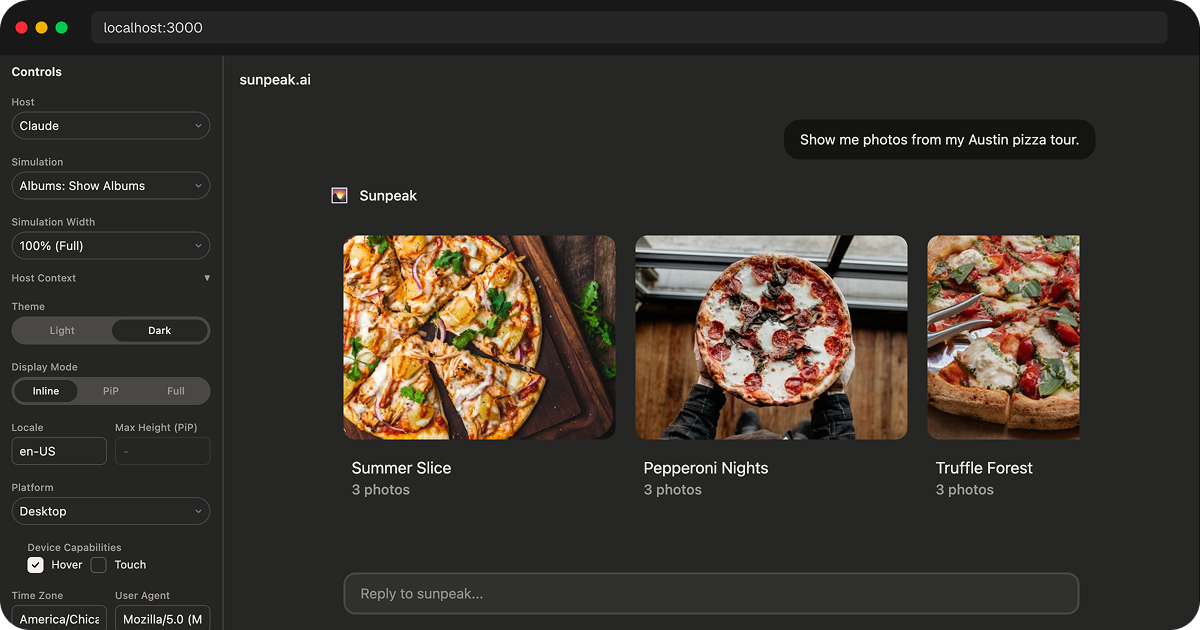
sunpeak Claude inspector.
A Claude Connector can work at the MCP tool layer yet still fail when Claude opens its UI. The tool may return the wrong data shape, the linked ui:// resource may fail to load, or a button may be clipped in the host iframe. A local Claude inspector helps you reproduce those cases before deploying.
TL;DR: Test the MCP contract first, then render a named simulation in the sunpeak Inspector and call the real server with non-empty input. Run the important UI states in Claude and ChatGPT projects when you support both. Keep one live Claude check for reachability, OAuth, tool selection, approvals, and host behavior the local replica cannot prove.
This guide uses MCP Apps for interactive connectors. Data-only connectors still need tool, auth, and result tests, but they do not need an iframe test. The sunpeak Inspector gives the interactive case a repeatable local host surface and a browser target for automated tests.
What the Claude Inspector Actually Tests
The inspector is a local replica of an MCP App host runtime. It does not call the real Claude service. It gives your app a conversation wrapper, host context, tool input, tool result, display mode, theme, viewport, and iframe boundary. You can use the same tool result to test rendering in Claude-style and ChatGPT-style shells.
That makes it useful for the bugs you can reproduce with deterministic data:
- The tool returns the wrong
structuredContentshape. - The UI expects data in
_metathat the tool result does not provide. - The iframe works in ChatGPT chrome but clips in Claude chrome.
- A table, chart, or form breaks at narrow widths.
- An error state looks fine in light mode but unreadable in dark mode.
- A write action lacks a clear confirmation or success state.
- A connector has too many possible states to check by hand.
The MCP Apps overview describes the shared contract: a tool points at a ui:// resource through _meta.ui.resourceUri, the host reads that resource, and the View renders inside a sandboxed iframe. The View talks to the host through JSON-RPC over postMessage. The inspector exercises that local path, but it cannot prove that a deployed Claude account will grant the same permissions.
That is why local testing matters. Your connector has a protocol contract, a web UI if it uses MCP Apps, and a live host integration. Test each boundary with a check that can actually observe it.
Pick the Test That Can See the Failure
| Boundary | Local check | What a passing check proves |
|---|---|---|
| MCP tool | Call tools/list and tools/call with valid and denied inputs | The server registers the tool and returns the expected result or error |
| UI resource | Read the tool’s _meta.ui.resourceUri with raw resources/read | The linked HTML exists and its content item has the app MIME type and expected CSP |
| View behavior | Render a named simulation in the Claude inspector | The iframe handles a repeatable tool result, theme, and user action |
| Real data path | Render the tool with non-empty input | The running server returns data the View can display |
| Claude integration | Connect the deployed server in Claude | Claude reaches it and applies real auth, approvals, tool selection, and host capabilities |
The first four checks make the local loop fast. The last one catches integration behavior that a replica cannot promise. For a data-only connector, skip the UI resource and View rows. See the Claude Connector testing guide for more cases around auth and tool errors.
Start a Local Claude Runtime
For a new sunpeak project:
npx sunpeak new claude-inspector-demo
cd claude-inspector-demo
pnpm dev
Open localhost:3000, then select Claude from the Host dropdown. You can also open the Claude runtime directly:
http://localhost:3000?host=claudeFor an existing MCP server:
npx sunpeak inspect --server http://localhost:8000/mcpUse this when your server is already built with another SDK or framework and you only need a local Claude and ChatGPT runtime for inspection. The inspector connects to the server, discovers the available tools and resources, and lets you render states without moving your server into a sunpeak project.
Use Simulations Instead of Repeating Prompts
Manual prompting is fine for a first check, but it is a poor test harness. A simulation pins the state you care about so every engineer and every CI run sees the same result.
A useful simulation usually captures:
- The user-facing scenario, such as “show overdue invoices.”
- The tool name and input.
- The tool result, including
content,structuredContent, and_meta. - The tool whose registration links to the UI resource.
- Optional server mocks for follow-up actions.
That gives you repeatable coverage for empty lists, huge lists, expired OAuth, permission failures, destructive actions, slow loads, and partial data. These are the states that cause most connector bugs because they do not appear during a happy-path demo.
For example, save this as tests/simulations/show-invoice-queue.json:
{
  "tool": "show-invoice-queue",
  "userMessage": "Show overdue invoices",
  "toolInput": { "status": "overdue" },
  "toolResult": {
    "content": [{ "type": "text", "text": "Three overdue invoices." }],
    "structuredContent": {
      "invoices": [{ "id": "inv_123", "customer": "Acme", "totalUsd": 12480 }]
    }
  }
}
The filename is the simulation name used by inspector.renderTool('show-invoice-queue'). Keep fake customer and invoice data in fixtures. Use the running server, not a fixture, to test access control or whether an upstream API still returns the expected fields.
Check the Tool Result Contract
Before you focus on CSS, verify the result contract. The current ChatGPT MCP server guide describes content as model-facing text, structuredContent as data the model can inspect, and tool result _meta as client data hidden from the model. The host and View still receive _meta, so it is no place for credentials. If you provide an outputSchema, structuredContent must match it.
For Claude Connectors and ChatGPT Apps, this split is the difference between a clean app and a leaky one:
- Put the compact, model-relevant summary in
content. - Put typed UI data in
structuredContent. - Put UI helper data in tool result
_metaonly if the host supports that path. - Keep secrets, access tokens, and unnecessary personal data out of all three fields.
- Validate
structuredContentbefore the host sees it.
The inspector helps because you can see both sides of the failure. If the model-facing summary is wrong, the conversation view makes that obvious. If the iframe lacks the data it needs, the rendered app fails in the resource frame where you can debug it.
A short sunpeak protocol test catches a missing resource link before opening the browser:
import { expect, test } from 'sunpeak/test';

test('invoice tool links a readable MCP App View', async ({ mcp }) => {
  const tool = (await mcp.listTools()).find((entry) => entry.name === 'show-invoice-queue');
  const uri = tool?._meta?.ui?.resourceUri;
  expect(uri).toMatch(/^ui:\/\//);
  if (!uri) throw new Error('Missing UI resource URI');

  const listed = (await mcp.listResources()).find((resource) => resource.uri === uri);
  expect(listed?.mimeType).toBe('text/html;profile=mcp-app');
  expect(await mcp.readResource(uri)).toMatch(/<html/i);

  const result = await mcp.callTool('show-invoice-queue', { status: 'overdue' });
  expect(result.isError).toBeFalsy();
  expect(result.structuredContent).toHaveProperty('invoices');
});
sunpeak’s mcp.readResource(uri) fixture returns the HTML string. Use a raw MCP SDK resources/read call or test the resource handler when you need to assert the content item’s MIME type and CSP; a resources/list descriptor alone cannot prove the metadata the host applies. Seed the real tool call with an authorized invoice record, then test denied access separately. The MCP App conformance guide covers the full protocol and View boundary.
Diagnose a Failed Claude Connector Preview
| Symptom | Check first | Common cause |
|---|---|---|
| Tool succeeds but no View opens | tools/list metadata, then resources/read for its ui:// URI | Missing resource link, unreadable HTML, or wrong MIME type |
| Simulation renders but a real call fails | tools/call result and outputSchema | Fixture drift, invalid input, auth failure, or changed upstream data |
| Text response is wrong while the View looks right | content and structuredContent side by side | UI data was updated without the model-facing summary |
| View loads but a button does nothing | Bridge request, tool visibility, result, and host capability | App action lacks an allowed server tool or its failure is not handled |
| Local View works but Claude fails | Deployed URL, OAuth, CSP, and live host logs | A remote or host-specific boundary the local replica cannot prove |
Start at the first failing boundary instead of changing CSS or prompt text at random. For a blank View, inspect the browser console and failed network requests as well as the MCP response. The Claude Connector debugging guide has a broader failure checklist.
Test Claude Layout as Its Own Target
Claude and ChatGPT can both render MCP App-style resources, but they do not give your app identical surroundings. Conversation chrome, available width, theme variables, safe areas, iframe framing, file features, and host-specific APIs differ.
In the Claude runtime, check:
- Inline and each additional display mode that the View declares and the host supports. Do not assume a request for fullscreen or PiP will be granted.
- Narrow and wide viewports.
- Light and dark themes, including host CSS variables.
- Safe-area padding around sticky footers, toolbars, and action buttons.
- Long labels, empty values, and wrapping in dense tables.
- Error states that include a recovery action.
- Permission and confirmation screens for write tools.
Do the same state in the ChatGPT runtime when the app is meant to be cross-host. Keep shared MCP App code on shared concepts such as useToolData, useAppState, host context, display mode, resources, and tool results. Check optional capabilities before a host-only action. The cross-host testing guide covers how to choose a small matrix of states rather than testing every combination on every change.
Turn the Preview Into an E2E Test
The preview is useful once. The test is useful every time you change the app.
sunpeak’s Playwright fixture renders a tool state inside the inspector and gives you a locator scoped to the app iframe:
import { test, expect } from 'sunpeak/test';

test('invoice queue renders in the configured host', async ({ inspector }) => {
  const result = await inspector.renderTool('show-invoice-queue');
  const app = result.app();

  await expect(app.getByRole('heading', { name: 'Overdue invoices' })).toBeVisible();
  await expect(app.getByText('$12,480')).toBeVisible();
  await expect(app.getByRole('button', { name: 'Approve reminder' })).toBeEnabled();
});
The call above uses tests/simulations/show-invoice-queue.json. The sunpeak test config runs this test in its configured host projects, which include Claude and ChatGPT by default. Passing non-empty input instead calls the real server:
test('real invoice tool result renders', async ({ inspector }) => {
  const result = await inspector.renderTool('show-invoice-queue', { status: 'overdue' });

  await expect(result.app().getByRole('heading', { name: 'Overdue invoices' })).toBeVisible();
});
Seed the server with known invoices for this test. A simulation can keep the View test stable, while the non-empty input test catches drift between the fixture and the handler. Put theme and display mode options in the third renderTool() argument, for example renderTool('show-invoice-queue', undefined, { theme: 'dark' }).
A good first E2E suite for a Claude Connector covers:
- The main happy path.
- Empty data.
- Auth expired.
- Permission denied.
- Large data.
- One write action, including confirmation and result state.
Add visual regression tests for states where layout matters more than text. Charts, boards, image grids, PDF previews, and dense tables are all better caught by screenshots than by one-off text assertions.
Know What Still Needs Live Claude
The inspector should do most of the work, but it should not be your only release gate.
Run a narrow live host check when you need to prove:
- Claude can reach the deployed MCP server over HTTPS.
- The server supports the transport your target host expects.
- OAuth redirects, token refresh, and account linking work.
- Claude selects the right tool from the real tool descriptions.
- User permissions and write approvals behave correctly in the host.
- Directory submission assets and screenshots match the live product.
- ChatGPT-specific app behavior works through ChatGPT’s real MCP Apps bridge.
The Claude Platform MCP connector docs cover remote server URLs, authorization tokens, and tool configuration for the Messages API. That API connector test proves remote MCP tool behavior; it does not prove how an interactive View renders in a Claude product. The ChatGPT UI guide uses the MCP Apps bridge for shared UI behavior and adds optional ChatGPT extensions afterward. Check the actual product surface you plan to ship to.
Local tests keep this live pass small. Instead of manually retesting every UI state in Claude, you use the real host to check the integration boundaries that cannot be simulated with full confidence.
A Practical Claude Connector Test Plan
Use this as a release checklist:
- Unit test every tool handler with normal, empty, denied, and failed upstream data.
- Contract test
inputSchema,outputSchema, tool annotations, and error results. - Render the main UI states in the Claude inspector.
- Render the same states in ChatGPT if the app is cross-host.
- Run E2E tests against the inspector in CI.
- Add visual tests for layouts that can regress without changing text.
- Check CSP, external API domains, iframe embeds, and resource domains.
- Run one live Claude smoke test against the deployed server, including OAuth and a user action if the View can write data.
- Run one live ChatGPT smoke test if you plan to ship there.
This split keeps fast, deterministic tests local and leaves the slower live-host loop for the few things that require it.
Where sunpeak Fits
You can build Claude Connector tests with plain Vitest, Playwright, an MCP SDK, and your own local host harness. sunpeak packages that workflow because the hard parts repeat across MCP Apps, ChatGPT Apps, and Claude Connectors.
Use npx sunpeak new when you want a structured MCP App project with a dev server, resources, tools, simulations, the inspector, E2E tests, visual tests, and evals already wired together.
Use npx sunpeak inspect --server URL when you already have an MCP server and want a local Claude or ChatGPT runtime for inspection and testing.
The goal is not to avoid real hosts forever. The goal is to stop using real hosts for every code change. Test the states you can control locally, run them in CI, and save Claude or ChatGPT for the final integration checks that only the real product can answer.
Get Started
npx sunpeak newFurther Reading
- Testing Claude Connectors - unit, inspector, E2E, visual, and live checks
- How to Build a Claude App - portable MCP App architecture for Claude
- Live Testing Claude Connectors and ChatGPT Apps - when real hosts still matter
- MCP App Resource Metadata - resourceUri, CSP, domains, and visibility
- MCP App Host Context, Safe Area, and Viewport - avoid cross-host layout bugs
- MCP App CSP and External API Calls - lock down iframe network access
- Cross-host testing MCP Apps - test shared behavior and host differences
- MCP App conformance testing - tool, resource, and View contracts
- MCP App Inspector
- Claude Connector framework
- sunpeak testing framework
- sunpeak Inspector docs - simulations and host controls
- Official MCP Apps overview
- ChatGPT MCP Apps UI guide
- Anthropic MCP connector docs
Frequently Asked Questions
How do I test a Claude Connector locally?
Start a sunpeak project with npx sunpeak new my-app, enter the new directory, run pnpm dev, and select Claude in the inspector. For an existing MCP server, run npx sunpeak inspect --server URL. Check tools/list and tools/call, render a named simulation, call the real server with non-empty tool input, and test the supported themes and display modes before a live Claude smoke test.
What is the sunpeak Claude Inspector?
The sunpeak Claude Inspector is a local host runtime replica for MCP Apps and interactive Claude Connectors. It renders MCP App resources in Claude-style conversation chrome, loads deterministic simulation files, and gives Playwright tests a stable browser target. It does not connect to Claude or prove real account, OAuth, or host behavior.
Can the sunpeak Inspector replace live Claude testing?
No. The inspector should handle most deterministic development checks, including UI rendering, tool-result shape, display modes, themes, and regression tests. You should still run a small live Claude check for public network reachability, OAuth, real host tool selection, connector setup, and any behavior that only the production Claude host can prove.
Does sunpeak support both Claude and ChatGPT testing?
Yes. sunpeak is a cross-host MCP App framework and testing framework. The local inspector can render the same tool state in Claude and ChatGPT runtime replicas, and the Playwright fixtures can run E2E and visual tests across those hosts from one test suite.
What should I test first in a Claude Connector?
Start with tools/list, a valid tools/call, and one denied or invalid request. If the connector has UI, check its _meta.ui.resourceUri, read the ui:// resource, and verify the HTML MIME type and CSP. Then render empty, error, and main states in the Claude inspector, including a write confirmation if the app changes data.
Do I need a paid Claude or ChatGPT account for local MCP App testing?
No. Local inspector tests run on your machine with mock data and do not consume host credits. You only need real host accounts when you are ready to validate the deployed server inside Claude or ChatGPT, test real OAuth, submit to a directory, or run a narrow live-host smoke test.
What is the difference between local inspector tests and live host tests?
Local inspector tests are deterministic and cheap. They should cover most UI states, tool-result shapes, visual regressions, and cross-host layout differences. Live host tests use the real Claude or ChatGPT product, so they are best for reachability, auth, host-specific model selection, account permissions, and submission readiness.
Can one MCP App run in Claude and ChatGPT?
Yes, when both host setups support the required MCP Apps capabilities. Keep tools useful without UI, link any View through _meta.ui.resourceUri, and use the standard bridge for shared actions. Treat display modes, permissions, and host-only APIs as optional capabilities, then test each live integration before release.
